Even the best products, competitive pricing, a good Google Ads budget, and even your Shopping campaigns can fail to make an impact.
The problem’s probably your product feed.
Your feed tells Google what you sell, what it costs, whether it’s in stock, and where to buy it. Get that wrong or incomplete, and your ads pay for it.
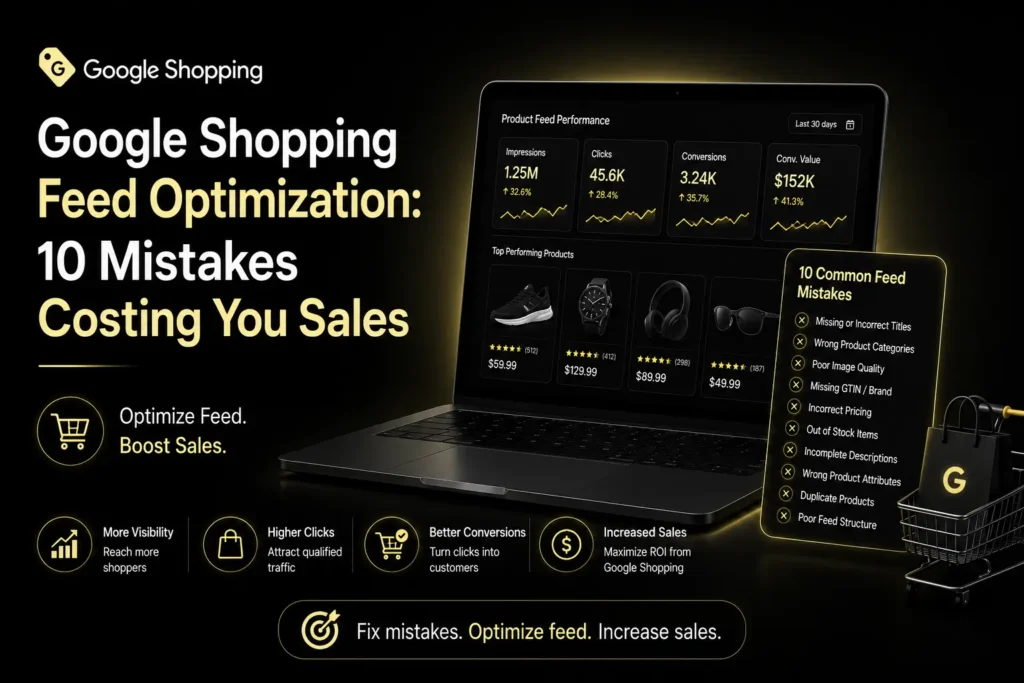
10 Common Google Shopping Feed Mistakes
Here are 10 common Google Shopping feed mistakes worth checking today.
1. Using Weak Product Titles
Your product title helps Google understand what you’re actually selling.
Skip vague titles like “Men’s Shoes.” Include real details: brand, product type, model, size, color, whatever’s relevant.
Google allows titles up to 150 characters, though shoppers might only see part. Put the important stuff first.
2. Missing or Incorrect product Identifiers
GTIN, brand, and MPN help Google identify products correctly.
One common mistake: leaving these fields empty when the info exists. Another: entering made-up or wrong identifiers just to fill the feed out.
Use accurate identifiers wherever they apply.
3. Showing The Wrong Price or Availability
Simple mistake, big impact.
Offer one price in your ad and another price in your website, and customers won’t trust you anymore. The same is true if Google states that a product is in stock but your product page tells another story.
Keep your feed and website synced. Google offers automatic updates for some mismatches, but that shouldn’t replace regular feed maintenance.
4. Using Poor-Quality Product Images
Your product image is usually the first thing a shopper notices.
Use clear, accurate images showing the real product. Avoid misleading imagery or anything that will make your product harder to identify.
Google needs one primary image for your product listed in Merchant Center and suggests adhering to their standards for image quality.
5. Sending Shoppers To The Wrong Landing Page
Your Shopping ad should take people straight to the relevant product page.
Don’t send someone looking for one specific product to a generic homepage or broad category page. A relevant landing page makes it easy to find the item and finish the purchase.
6. Leaving Important Attributes Incomplete
A product feed is more than title and price.
Depending on what you sell, important attributes include:
- Availability
- Condition
- Brand
- GTIN
- MPN
- Color
- Size
- Product category
Complete, accurate attributes give Google better information about your products, a key part of solid Google Merchant Center Feed Optimization.
7. Updating Your Feed Too Infrequently
Your product data never really sits still.
Prices change. Products sell out. New variants show up. Promotions end.
That’s why Product feed optimization isn’t a one-time task. Your feed should reflect real changes fast, especially price and inventory.
8. Ignoring Merchant Center Disapprovals
Don’t ignore warnings and disapprovals in Merchant Center.
A disapproved product might not be eligible for Shopping ads or free listings at all. Check diagnostics, find the cause, fix the data, resubmit when it makes sense.
Small feed issues affect more products than most people realize.
9. Missing Sale And Promotion Opportunities
Running a real discount? Make sure your product data actually reflects it.
Google supports attributes like sale price and promotion info. Use them right, and shoppers understand your offer before they even click.
Just make sure the promo info matches what’s actually on your website.
10. Treating Feed Optimization As A One-Time Task
Probably the biggest mistake on this list.
Your feed needs ongoing attention. Product info, inventory, prices, promotions, your entire product range, all of it shifts.
If managing this internally gets hard, Google Shopping feed optimization services can help keep your data cleaner and more accurate.
How Do You Resolve Errors in Google Shopping Product Feeds?
Begin from the very beginning.
Check your titles, IDs, pricing, availability, images, landing pages, and Merchant Center diagnostics. Next, create an ongoing system for testing your feed rather than troubleshooting later.
For larger accounts, tie feed improvements to your wider Shopping and Performance Max strategy. A Google Performance Max case study can reveal which products and categories deserve deeper feed work.
If your account’s grown complex, a Google Shopping Ads Agency can help manage feed quality alongside the rest of your strategy.
Conclusion
Your Shopping campaigns are only as strong as the product information behind them.
Fix these Google Shopping feed mistakes, keep your data accurate, and review the feed regularly. Better feed quality gives campaigns a stronger foundation, and helps you avoid losing sales over problems that were entirely preventable.
FAQs
1. What is Google Shopping feed optimization?
Process of ensuring the improvement and proper maintenance of your product data so that Google can understand your product and show relevant information to users.
2. How often should you update a Google Shopping feed?
Whenever important product information changes. If prices or inventory shift often, your feed needs to reflect those changes quickly too.