Nobody buys on the first visit. Well, almost nobody.
They browse a product, check the price against a competitor, maybe drop something in the cart. Then they close the tab.
That’s not the sale disappearing, though. Not quite.
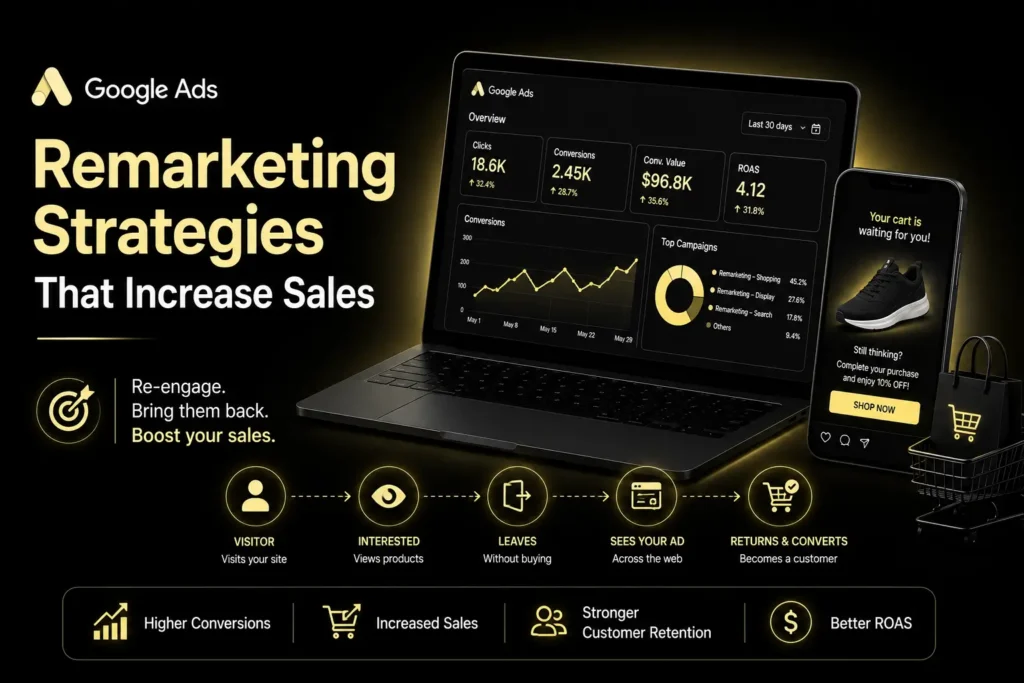
Google Ads remarketing reconnects with those who have already shown interest. Show them the right thing at the right moment, and a chunk of them come back.
Here’s what actually moves the needle on turning past visitors into customers.
What is Google Ads Remarketing?
This is the display of ads to those who have visited your website or application already.
No cold audience here. These are people who already know your brand exists.
According to Google: remarketing uses previously established interactions with your website or application; audience targeting adds interest, behavior, and demographic targeting to the process.
No wonder that it is great at re-engaging potential customers.
1. Create Segments Of Your Remarketing Audiences
Treating all visitors equally? The biggest marketing mistake ever.
The person who browsed your homepage is not thinking the same as the one who has added the product to the basket.
Build audiences around actual behavior:
- Product viewers
- Cart abandoners
- Pricing-page visitors
- Previous customers
- Recent website visitors
For particular audiences, there are particular advertisements that work better. This is confirmed by WordStream, which advises segmentation to avoid wasting money on just one broad audience.
2. Match Your Ads To The Customer Journey
One question your remarketing ad has to answer: why come back now?
Someone browsed a product but skipped checkout? Show them that product again. Someone hit your pricing page? Talk value, or handle the objection they’re probably stuck on.
The ad should feel like a continuation, not a fresh pitch.
This is Google Ads audience targeting performing its function. Different audiences, different messages.
3. Use Dynamic Remarketing For Product-Based Businesses
Got a catalog of products? Dynamic remarketing changes the game here.
Google’s take: it shows past visitors ads built around the specific products they looked at, pulling from a feed of product data plus visitor behavior.
Picture someone browsing running shoes, then bouncing without buying.
Dynamic remarketing puts that exact pair back in front of them instead of some generic brand banner. Less friction, clearer next step.
4. Combine Remarketing With Better Audience Data
Remarketing’s only as good as the data feeding it.
Google Ads works off past interactions, sure, but PPC folks are increasingly stacking in consented first-party data too, customer lists layered on top of browsing behavior.
Exclusions deserve attention here as well.
Already bought? They shouldn’t be seeing acquisition ads anymore. Put them in a separate campaign built for repeat purchases or upsells instead.
5. Use PPC Remarketing Across Search And Display
PPC remarketing is a lot more than banner ads chasing people around the internet.
It works inside Search too. RLSA and similar approaches let advertisers use info about past visitors the next time they search, which opens another door back into a conversation that’s already started.
It needs to fit your broader account structure, though. Make sure remarketing connects properly to your Google Ads Structure for D2C rather than running as an island.
Worth understanding Performance Max vs Search Campaigns here too, since that decides where remarketing actually fits into the bigger PPC picture.
6. Reduce Wasted Spend With Exclusions
More impressions, more sales? Not automatically. Not even close, sometimes.
Focus on the people viewing your advertisements and how many times they see your advertisements.
Remarketing reach report from Google will precisely tell you how much of your eligible audience you are reaching.
Watch:
- Audience size
- Conversion rate
- Ad frequency
- Placement performance
- Converted-user exclusions
Simple goal underneath all of it: put the budget behind people who actually might buy.
Conclusion
Google Ads remarketing works once you stop treating every visitor like the same person.
Segment. Match the message to intent. Bring in dynamic remarketing where it fits. Keep testing exclusions.
You’re not selling a cold stranger on your brand.
You’re giving a person who’s already interested one more reason to return and finish what they started.
FAQs
1. What is Google Ads Remarketing?
It is an approach of contacting those individuals who have previously engaged with your website or application.
2. How does dynamic remarketing work?
It pairs visitor behavior with a product feed to build ads around what that person already looked at.
3. Is remarketing good for increasing sales?
Usually, yes, since you’re reaching people who already showed interest. The real gains come from tight segments, relevant messaging, and exclusions that actually get used.